
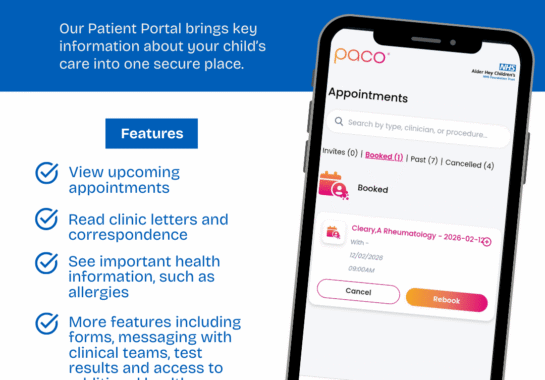
Alder Hey will soon launch Alder Connect, our new patient portal. This platform will allow families to access key information about their child’s care at Alder Hey through a single, secure system.
In the first phase of the launch, families will be able to:
- View and respond to appointment invitations
- Access appointment and clinic letters
- View allergy information recorded by the Trust for their child
Over the coming months, additional features will be introduced for registered families, including:
- Questionnaires
- Medication information
- Test results
To begin the transition to the new portal, Alder Hey is starting a pre-registration campaign. The information below provides details on the pre-registration process and how to get started.
Pre-registration
What is pre-registration?
Pre-registration will enable families to create an account on Alder Connect before the portal officially goes live. This will mean that, from go-live, the pre-registered families will have instant access to their hospital-related information (appointment letters and clinic letters) digitally via this platform.
How can I pre-register for Alder Connect?
The pre-registration is being managed by Alder Hey, initially inviting families to register in small groups.
The first group of invites will be sent to users who have previously registered for the Healthcare Comms portal to view clinic letters from Alder Hey electronically.
Following this, patients with upcoming appointments will be invited to pre-register.
Why can I not see any of my child’s appointment information when I sign in?
As this is a pre-registration phase, no clinical information will be viewable until the official go-live.
Do I have to pre-register for the portal?
You do not have to register for the portal, but registering is the only way to receive information digitally. Also, there will be many new features coming to the portal, so by registering, you will have access to them as they go live. If you chose not to register, you would continue to receive paper appointment letters.
Can another person with parental responsibility for the child or young person also register for an account?
Initially, only one person can register an account for each child. In a later phase, the system will allow additional people with parental responsibility to access the child’s account.
Can I add multiple children to my account?
Yes, you can add multiple children to your account. Although you will need to register them at the point of receiving a link to do so. This is because each patient needs to be signed up with a unique link.
When will the portal be live?
The team are working hard at the moment, whilst pre-registration is in progress, to ensure the portal is ready for go-live. The go-live date is currently planned for 31st March.
Why haven’t I received an invitation to register?
Pre-registration is currently by invitation only. Wider access will follow as the portal continues to roll out.
How to register
Once you have been contacted via text to pre-register, please follow the following steps:
Open the unique link sent via a text message from Alder Hey
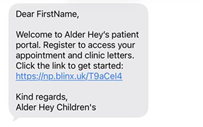
This will launch the registration screen

Select whether you are the parent or the child registering.

If you are registering as the parent, please ensure the patient’s name shown is the correct child’s name.
Enter your email address (this will be your username)
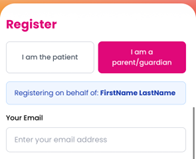
Input your mobile number (this needs to be the number which received the invite to register).

Select from the calendar your child’s date of birth.

Enter your first name and surname

Create a password and input this into the next two fields

Select ‘Register’

If you have already registered for the portal for one of your children and are invited to register another, you can register them and link their account to your existing login.
- Open the unique link in the text message.
- Commence the registration form, inputting your email, mobile number and their date of birth.
The portal will then enable you to sign in with your current account details. Once sign-in is validated, your multiple children’s accounts will be accessible through the single login.
Troubleshooting
Select the unique link sent to you via text.
- Select the parent registration and ensure that the patient’s name shown is the correct child.
- Ensure the mobile number you are using to register is the one that received the pre-registration invite.
- Ensure that the correct date of birth has been inputted, in the correct format (DDMMYYYY)
- Once registered, you would need to enter the authentication code you received via text to confirm your login.
- If you already have an account with one child and are now registering another, ensure you use a unique registration link.